Websites and agents: what counts, and when you need another agent
What counts as a website, how one agent answers on several sites, and when a website needs its own agent.
Getting started · Updated
What counts as a website
A website is a domain with all its subdomains: acme.com covers www.acme.com, shop.acme.com and docs.acme.com. It counts once on your plan, whether your agents read it as knowledge, answer on it, or both.
- Free: 1 website and 1 agent
- Starter: 5 websites and 2 agents
- Pro: 25 websites and 5 agents
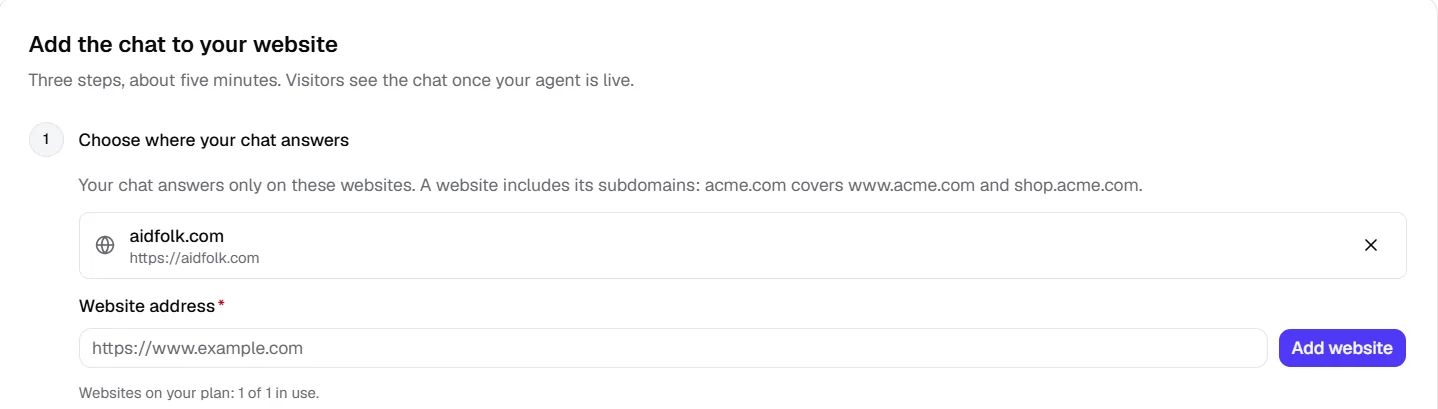
The agent's Widget & embed shows how many your plan has in use: “Websites on your plan: 2 of 5 in use.”
One agent on several websites
- Open the agent's Widget & embed. The first step is Choose where your chat answers.
- Type a Website address and click Add website. Repeat for each site. Websites your knowledge already reads show as one-click buttons and use no extra website.
- Paste the same chat code on each of those sites.
An agent that lists no websites answers on your workspace's website (Settings › Workspace). On a site that isn't on its list, the chat bubble shows but answers “This chat isn't available on this website yet.”, so add the site and it works.
The same answers everywhere
One agent has one set of instructions, one knowledge and one look on every website it's on. Visitors on all of them get the same answers.
When to give a website its own agent
Create another agent when a website needs any of these to be different:
- its instructions (for example, a formal tone for one brand and a friendly one for another)
- its knowledge (another product, other prices or policies)
- its look: title, welcome message, colour and icon
Agents can share knowledge: link a common source, such as your company FAQ, to each of them, and add each site's own pages to its own agent. All agents use the same monthly credits.
How credits are counted across all of them: how AI credits work.
Still stuck? Email support@aidfolk.com and a person will answer.