Improve your agent's answers
Find the questions your agent couldn't answer, add the answer once, and read the ratings and leads your visitors leave.
Knowledge and answers · Updated
Your agent never guesses: when your knowledge doesn't hold the answer, it gives your no-answer message and the question is flagged for you. Answering those questions once is the quickest way to make it better every week.
1. Find the questions it couldn't answer
- Go to Conversations › Unanswered questions. It lists each question with its agent, where it was asked (Website or Test chat) and when. It shows Still unanswered first; “All caught up” means there's nothing left.
- Click a question to open its conversation at that answer.
In any conversation, a reply that had no answer says “No answer in the knowledge: this got the agent's no-answer message.”
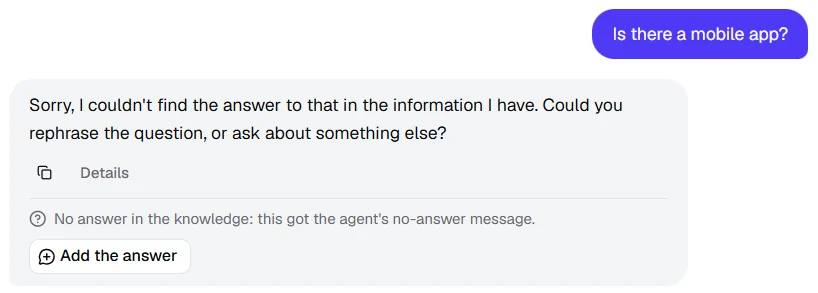
2. Add the answer
- Under that reply, click Add the answer.
- Type the answer the way you'd want a customer to read it.
- Click Add to the FAQ. It's saved as a question in the agent's FAQ (one is made if the agent has none yet), and the agent answers it next time, in a moment.
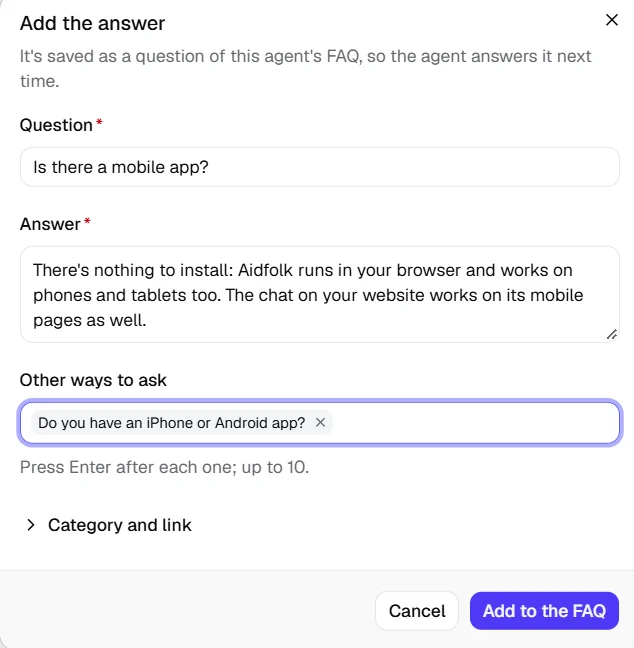
You can do the same in Test chat, so a gap you find while testing is fixed before a customer meets it.
3. Read the ratings
Visitors can rate each answer with a thumb up or down (the switch is in the agent's Widget & embed). Transcripts show “The visitor found this helpful” or “didn't find this helpful”, and Analytics shows the share of helpful answers and the unanswered ones. A thumb down on an answer that cited the right page usually means the page itself needs a clearer sentence.
4. Reply to visitors who left their email
When the agent can't answer, it can ask for the visitor's email. You get an email for each one, and Conversations › Leads lists them with their question. Free takes 25 a month; paid plans take any number.
To see what your agent knows from a page or file, see adding knowledge.
Still stuck? Email support@aidfolk.com and a person will answer.