Sources you can check
Answers cite the pages and documents they came from, with page numbers for PDFs. Try questions first in a private test chat that also shows the model and the credits each answer used.
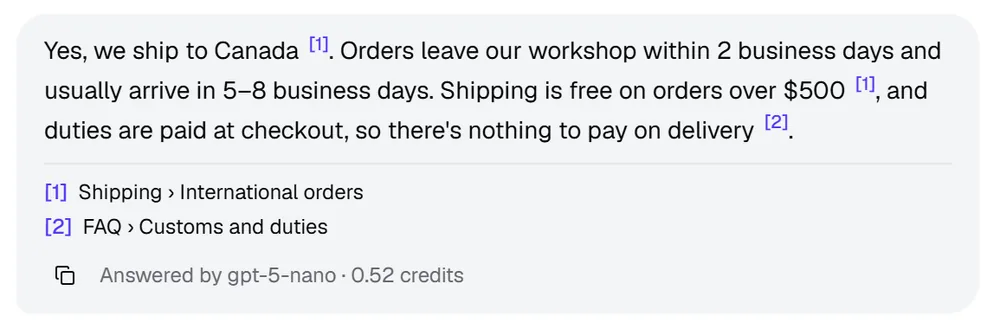
Aidfolk reads your website, help center and files, and answers your customers in a chat on your site with the sources behind every answer. When the answer isn't there, it says so, and the question comes to you to answer once.
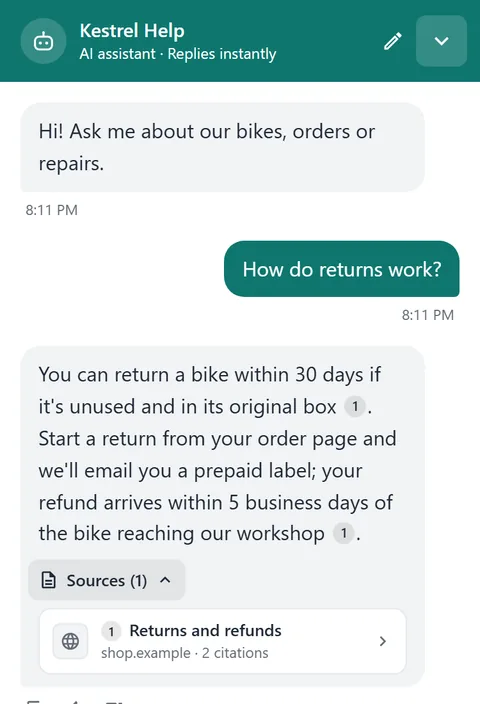
Kestrel Help
AI assistant · Replies instantly
Do you ship to Canada?
Yes, we ship to Canada1. Orders usually arrive in 5–8 business days, and duties are paid at checkout2.
Sources (2): Shipping, FAQ
Do you sell gift cards?
I don't know that one, sorry: Kestrel's pages don't cover it, and I only answer from them. Our team can help.
Contact us
AI-written answers can be wrong. Confirm anything important with us.
See it work
A recording of the real Aidfolk app and chat widget, with an example shop's data.
The honesty loop
Your customers get answers they can check. When something isn't covered yet, you hear about it, and fill the gap once.
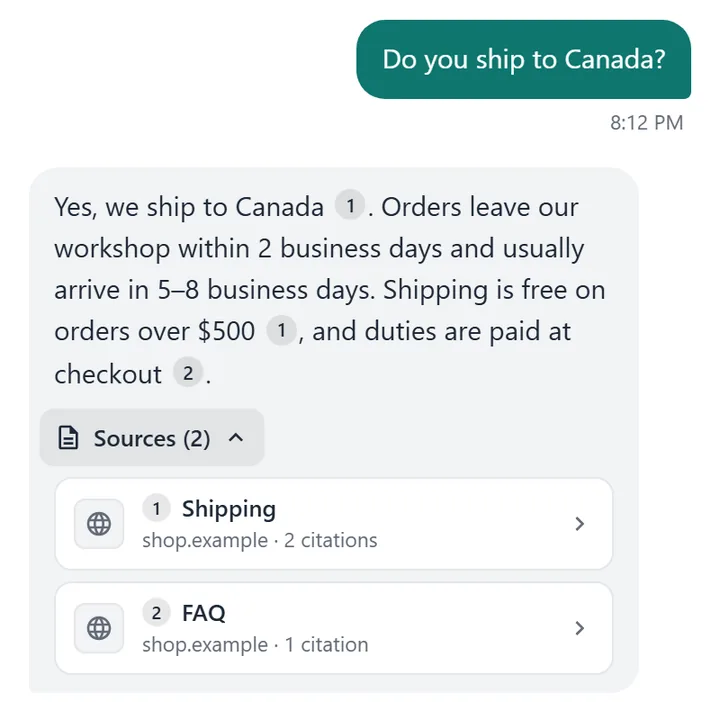
Step 1
Every answer comes from your website, files and notes, and cites the pages it used with numbered links, so your customers can check it and read on.
Step 2
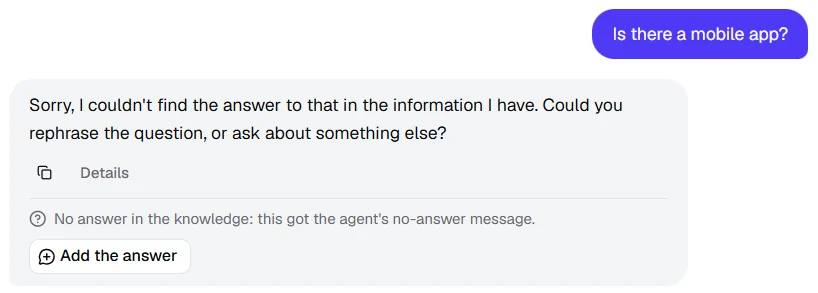
No guessing: when your content doesn't hold the answer, the visitor gets your no-answer message and a way to reach your team, and the question lands in Unanswered questions.
Step 3
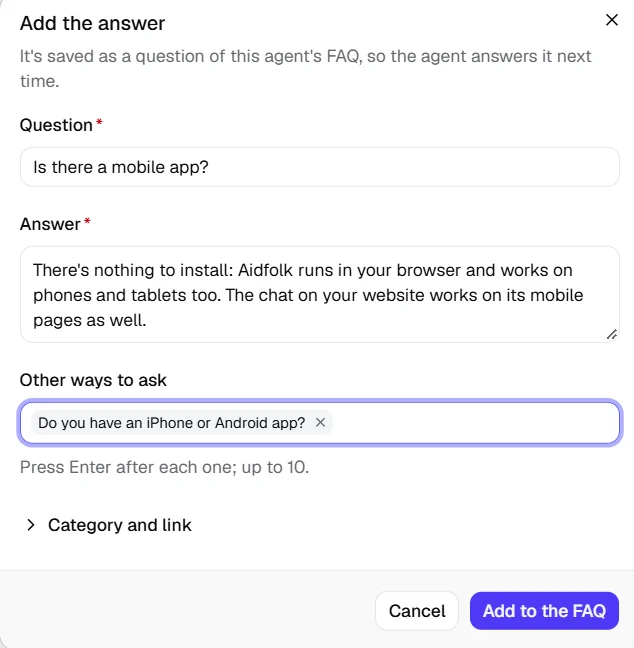
Click “Add the answer”, type it and save: it goes into the agent's FAQ, and the next visitor who asks gets it, with your FAQ as the source.
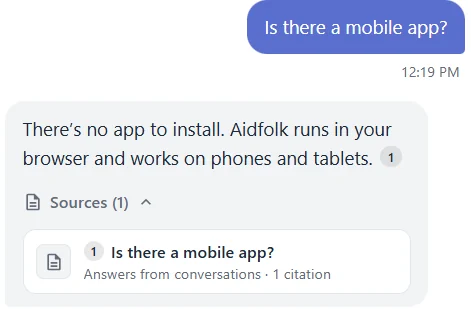
Screens from the Aidfolk app and widget: an example shop's data, and Aidfolk's own agent on aidfolk.com.
Features
Grounded in your content, honest about what it doesn't know, and easy for a small team to run.
Answers cite the pages and documents they came from, with page numbers for PDFs. Try questions first in a private test chat that also shows the model and the credits each answer used.
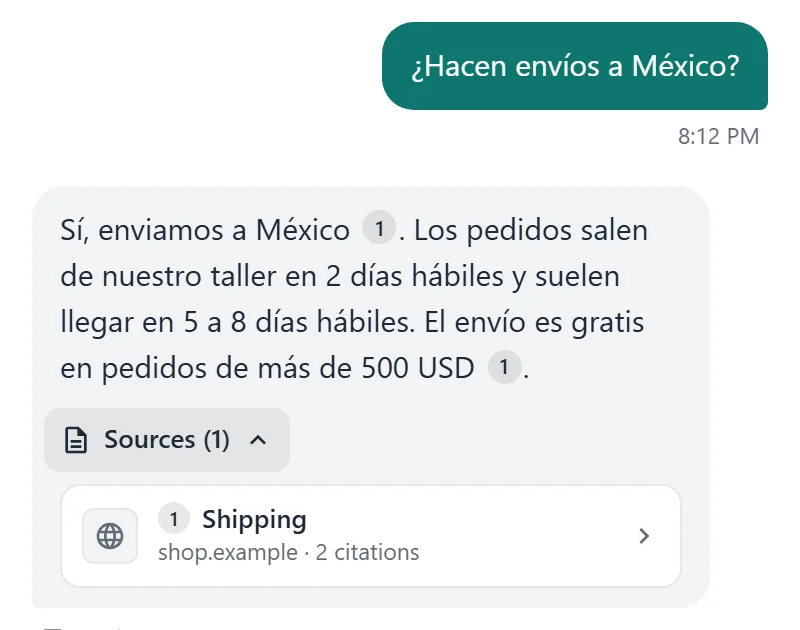
Visitors ask in their own language and get the answer in it, from your content, even when it's all in English.
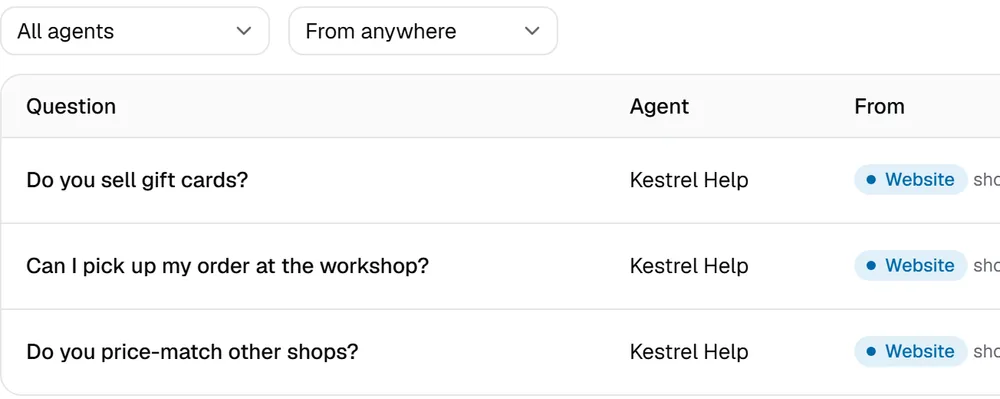
See what your content doesn't cover yet and where it was asked, then write the answer in one click.
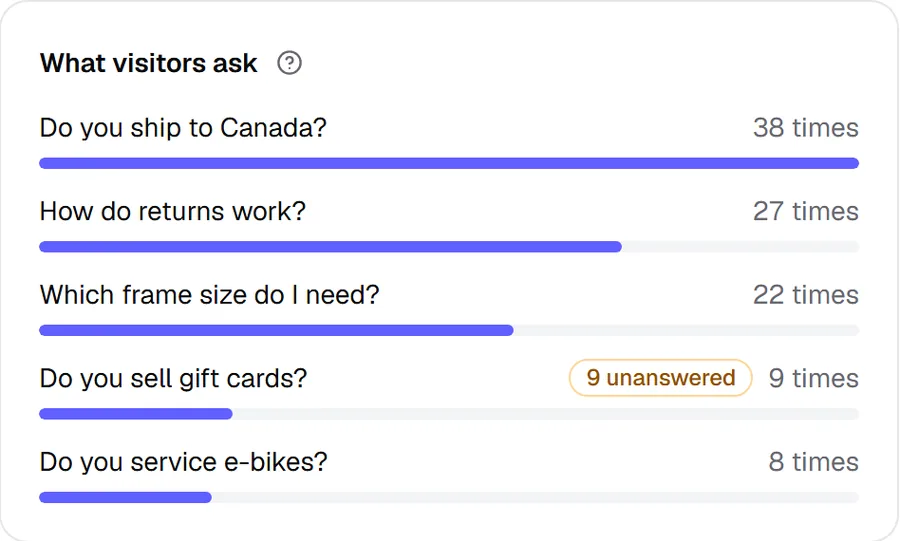
Conversations over time, the questions asked most, the ones left unanswered, the pages used most and how visitors rate the answers.
One line of code on WordPress, Shopify, Wix, Webflow, Squarespace or your own site. See where it goes.
Why Aidfolk
Plans side by side, from each company's own pricing page, checked on .
| Aidfolkaidfolk.com | Chatbasechatbase.co | CustomGPT.aicustomgpt.ai | DocuChatdocuchat.io | |
|---|---|---|---|---|
| Free plan | Free, no time limit, no card: 50 AI credits a month (about 100 answers), 1 agent | None on its pricing page; each paid plan starts with a 7-day trial | None on its pricing page; every plan starts with a 7-day free trial | Free, no credit card: 7,500 AI credits a month (about 75 fast-model questions, by its own estimate), 1 chatbot |
| Cheapest paid plan, billed monthly | Starter: $29 a month | Hobby: $40 a month | Standard: $99 a month | Essential: $49 a month |
| What that plan includes | 2,000 AI credits a month (about 4,000 answers), 2 agents, 3 team members | 700 message credits a month, 1 agent, 2 members | 1,000 queries a month, 10 agents, 3 team members | 50,000 AI credits a month (about 500 fast-model questions, by its own estimate), 3 chatbots |
| Removing the “Powered by” badge | Included from Starter ($29 a month) | A paid add-on: $99 a month | Included from Premium ($499 a month) | “Branding and white label options” listed on Pro ($99 a month) |
Each product counts usage in its own unit. See the full comparison, with every source.
Use cases
Wherever customers ask questions your website and documents already answer.
AI chatbot for SaaS
“How do I reset my password?” “Can I change plans?” Repetitive questions fill your team's week and push the hard ones down the queue.
Learn moreDocumentation chatbot
Keyword search lists every page that mentions a word. Readers want the one sentence that answers their question.
Learn moreAI chatbot for small business
Evenings, weekends, the middle of a client call: an unanswered question is often a customer who goes elsewhere.
Learn moreSecurity and privacy
Your content and your customers' conversations are used to answer your customers, nothing else. We don't sell personal data or use it for advertising.
Pricing
Every plan includes AI credits for your agents' answers. No per-seat or per-resolution fees.
Remove the “Powered by Aidfolk” badge from Starter, $29 a month
Try it on your own content: one agent on your website.
$0/ month
Free forever, no card needed
Start freeFor a small team answering customers on its website.
$29/ month
or $290 a year (2 months free)
Start freeMost popular
For teams running support and documentation.
$99/ month
or $990 a year (2 months free)
Start freeEvery account starts on Free, with no card. Prices are in US dollars. Compare every limit.
ChatGPT is a general assistant: it answers from what it learned in training and from the web. An Aidfolk agent answers only from the content you give it (your website, files and notes), shows the pages it used, and says it doesn't know when your content doesn't hold the answer. It lives in a chat widget on your website, and you see every conversation and every question it couldn't answer. The answers are written by AI models from providers such as OpenAI, Anthropic and Google, but only from your content.
It answers from the passages of your content that match each question, so it's as accurate and up to date as your content, and every answer lists its sources so your customers and your team can check them. AI can still get things wrong, which is why the sources are there. When your content doesn't hold the answer, the agent gives your no-answer message instead of guessing, the visitor can leave their email so your team can reply, and the question appears under Unanswered questions, where one click starts the note that answers it next time.
The language the visitor writes in, even when your content is in English: a question in Spanish gets its answer in Spanish, from your English pages. The widget's own buttons and labels are in English.
Your account, your content and your customers' conversations are stored in North America: the app and its database on DigitalOcean's servers, uploaded files in Cloudflare's private storage. To write an answer, the question and the passages that match it go to the AI provider of the model used (OpenAI, Anthropic, Google or OpenRouter), and OpenAI indexes your content and checks it for adult material. Our privacy policy lists every company that processes data for us, and what for.
No. We never use your content or your customers' conversations to train AI models, and we don't sell personal data or use it for advertising. To answer a question, the AI model receives only the question, the passages from your content that match it, your agent's instructions and the last few turns of the conversation.
Yes. The widget is one line of code, so it works on any site where you can add custom code: in WordPress with a header-and-footer code plugin, in Shopify's theme.liquid, in Wix's Custom Code (on a published site with a connected domain), in Webflow's footer code (a paid site plan) or in Squarespace's Code Injection (its higher plans). Our installation guide shows where, step by step.
A few minutes for a small site: sign up, add your website (Aidfolk finds its pages and reads them), try a few questions in the private test chat, then paste the snippet into your site. Your email address needs to be verified before the agent goes live on your site.
Yes. Free has no time limit and needs no card: it includes 50 AI credits a month (about 100 answers), one agent and every kind of knowledge, and every account starts on it. Its widget shows a small “Powered by Aidfolk” link; hiding it starts on Starter.
Credits pay for the AI behind each answer, at cost: 1 credit is $0.001 of AI usage at the provider's list price, and a typical answer uses about 0.5 credits with the default models. Every plan includes credits each month: Free 50, Starter 2,000, Pro 10,000. Answers on your own AI key (Pro) use none.
Free is free, with 50 AI credits a month (about 100 answers). Starter is $29 a month and Pro $99, with 2,000 and 10,000 credits. Yearly plans get 2 months free.
Yes. Free has nothing to cancel. A paid plan can be cancelled any time from Billing in the app: it stays until the end of the period you paid for, then your workspace moves to Free. A first payment is refunded in full if you ask within 14 days.
Start on the Free plan with 50 AI credits a month. No card needed, and your agent can be live on your site today.